

























New Owner's Guide


Key function
The positions and combinations of the buttons are as follows:
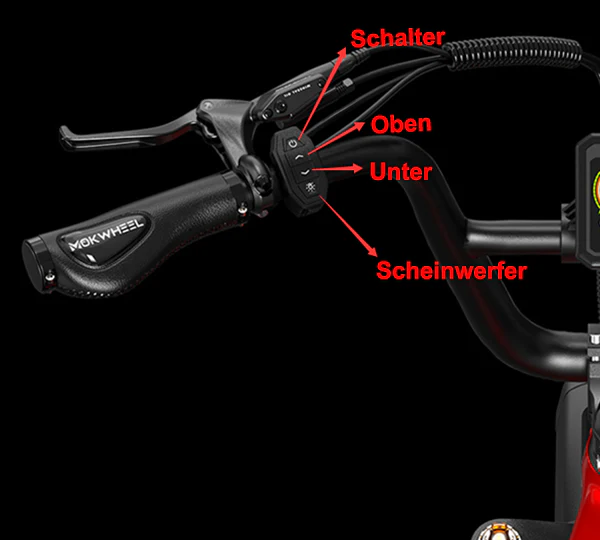
Power on/off
Function
Headlight
Settings
a.Speed display: (Average speed AVG) Maximum speed MAX)
b.Display of the total mileage (ODO) and the current one Individual mileage (TRIP)
LCD odometer display
Display Function Speed, power-assisted gear level, battery power, total mileage, single ride mileage, single riding time, error code.
Description of Display Contents All displayed contents (appear within 1 second of turning on e-bikes) Press and hold MODE to turn on the bike.


Parameter Settings
Press and hold both + , to enter the parameter setting page.
Press briefly under the “Settings” menu item or , to adjust the value/unit. After the change, the parameter flashes.
After confirming the set parameter:
1. Press once to select the current setting item to set the parameter value. After the parameter value is set, press once to confirm the current setting. Then it returns automatically returns to the previous interface.
2. Press to finish the setting and save the parameters. If the button is not pressed, the changed parameters will automatically exit and save after 10 seconds
Please note: Some displayed contents of the product you receive from MokWheel may differ from the instructions due to product updates. However, this will not affect your use of the product.
Safety checklist
NOTE: Before each ride, it is important to complete the following safety checks.



